Driver Portal Lockout Auto-Recovery
Overview
To improve the Driver Portal login experience, Catch-e supports automatic password recovery when a driver becomes locked out due to multiple failed login attempts.
Previously, drivers who exceeded the permitted number of login attempts would receive a locked account message and be required to manually complete the password reset process. This enhancement automatically initiates password recovery when a lockout occurs, helping drivers regain access more quickly and reducing support requests.
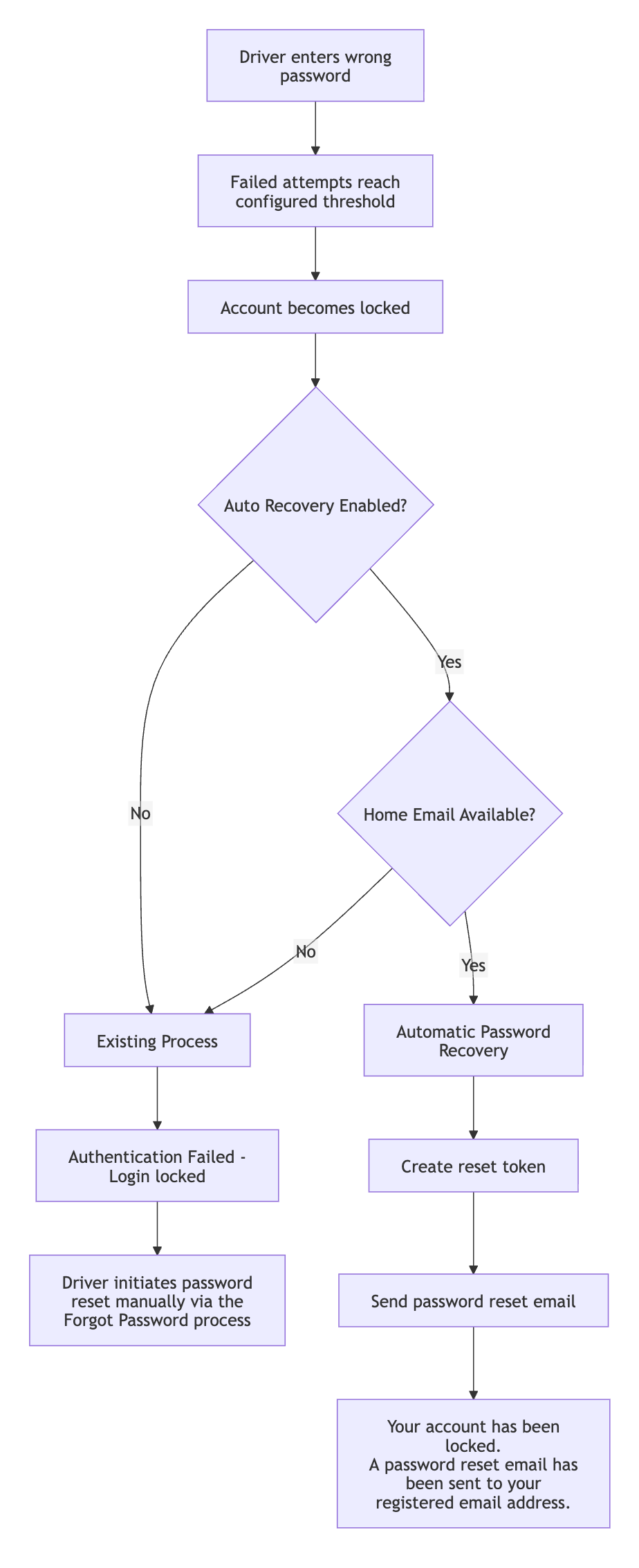
How It Works
Login Attempt Threshold
The Driver Portal uses the system control:
gb::driver_portal_maximum_login_attempts
to determine how many failed login attempts are allowed before a user is locked out. If the control is missing or contains an invalid value, the system defaults to 3 login attempts.
Failed Login Attempts
If a driver enters an incorrect password but has not yet reached the lockout threshold:
Login is denied.
The standard authentication failure message is displayed.
No password reset process is triggered.
No password reset email is sent.
Account Lockout
Once the configured login attempt threshold is reached, the driver's account is locked. The system then checks whether automatic recovery has been enabled using the control:
gb::driver_portal_password_auto_recovery_flag
Auto-Recovery Disabled
When the auto-recovery control is set to No:
The account is locked.
No password reset token is created.
No password reset email is generated.
The driver sees the following message:
Authentication Failed - Login locked
This behaviour is consistent with the standard lockout process.
Auto-Recovery Enabled
When the auto-recovery control is set to Yes, the system automatically attempts to initiate the password reset process when a driver's account becomes locked.
Driver Has a Registered Email Address
If the driver has a valid email address stored in their Home Email field:
The account is locked.
A password reset token is generated.
A password reset email is sent to the registered email address.
The login page displays the following message:
Your account has been locked. A password reset email has been sent to your registered email address.
The driver can then use the password reset link provided in the email to regain access.
Driver Does Not Have a Registered Email Address
If no email address is stored for the driver:
The account is locked.
No password reset token is created.
No password reset email is generated.
The standard lockout message remains displayed:
Authentication Failed - Login locked
A valid email address must be stored against the driver record for automatic recovery to occur.
Important Notes
Existing Locked Users
Automatic recovery is only triggered at the point a lockout occurs.
If a driver is already locked and attempts to log in again:
No new password reset email is generated.
No additional password reset token is created.
The existing lockout message remains displayed.
Forgot Password Functionality
The existing Forgot Password process remains unchanged and continues to be available to drivers. Password reset emails generated through the Forgot Password page continue to use the email address provided and validated during submission.
No Impact on Other Authentication Flows
This enhancement applies only to the Driver Portal login lockout process and does not affect:
Driver Portal Two-Factor Authentication (2FA) lockout behaviour.
Driver Portal 2FA attempt limits.
Benefits
Reduces support requests relating to locked Driver Portal accounts.
Simplifies the account recovery process for drivers.
Provides immediate guidance when an account becomes locked.
Improves the overall Driver Portal user experience.
Was this helpful?
Still need help? Ask the team