JATO Vehicle Data Import
The import process retrieves vehicle information from JATO and synchronises it with the Catch-e vehicle database.
Process Flow
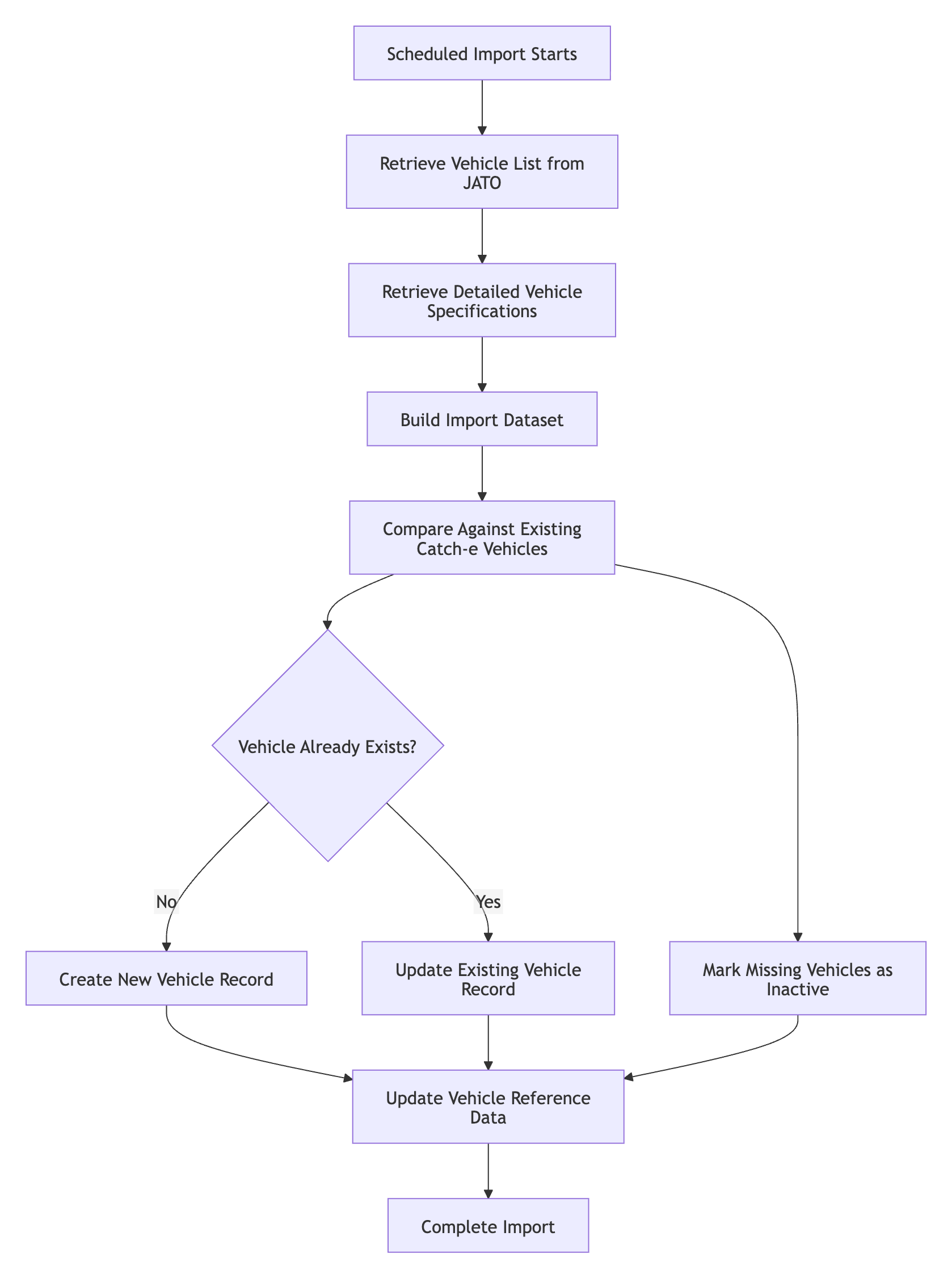
Vehicle Information Imported
The integration imports a wide range of vehicle information, including:
Vehicle Details
Make
Model
Variant
Vehicle type
Body style
Seating capacity
Number of doors
Build year
Model year
Availability dates
Front and rear tyre sizes
Kerb weight
Engine and Drivetrain
Fuel type
Power output
Torque
Transmission
Drive type
Fuel capacity
Fuel consumption (Fuel Metro and Fuel Country)
Powertrain classification (see Vehicle Type and Powertrain Classification below)
Fuel capacity, fuel consumption and kerb weight are populated where JATO holds a value. They are only supplied in JATO's full leasing data set ("JaaS API Default"). Where JATO holds no value, for example fuel consumption for a battery electric vehicle, the field is left blank rather than set to zero.
Pricing
Retail price
Base price
GST component
GST is calculated at the rate in force, applied to JATO's base price. Any Luxury Car Tax remains within the gross list price. A warning is raised if the retail price is less than the base price plus GST.
Electric Vehicle Information
Where available, additional EV information is imported, including:
Battery capacity
Driving range
Charging capability
Battery warranty information
Equipment and Options
The integration imports:
Standard equipment
Optional equipment
Paint colours and paint options
Standard equipment is selected using a Catch-e list of the JATO items that count as standard equipment. An item is added only if JATO marks it as fitted. Items within JATO options or packs are never treated as standard equipment. When a vehicle is updated, items no longer fitted are removed and newly fitted items are added. If JATO returns no specification for a vehicle during an import, that vehicle's equipment and figures are left unchanged.
Variant Descriptions
Each JATO variant's description is built from the model, trim, version name, body type, doors, transmission, gears, drive type, engine size and model year. Descriptions that exceed the field length are shortened, and a warning is recorded in the import summary.
Vehicle Creation and Updates
Each vehicle supplied by JATO contains a unique identifier which is used to determine whether the vehicle already exists in Catch-e.
New Vehicles
If a vehicle does not already exist in Catch-e:
A new vehicle variant record is created.
Associated options and specifications are imported.
The vehicle becomes available for quoting and ordering wherever JATO is the vehicle data source.
Existing Vehicles
If a vehicle already exists:
Changes to specifications, pricing, or equipment are updated.
Existing references remain intact.
Vehicle information remains synchronised with JATO.
Vehicle Availability Management
JATO identifies whether a vehicle is currently available or has become outgoing. The integration uses this information to maintain vehicle status in Catch-e.
If a vehicle is no longer supplied by JATO, it is automatically marked as inactive rather than being deleted. This preserves historical quote and contract data.
Quote Copy Behaviour
When a quote references a vehicle that has since become inactive, the system supports the use of successor vehicle records.
Where a replacement vehicle has been identified:
The successor vehicle is automatically used when the quote is copied.
Where no replacement exists:
The user must be made aware that the selected vehicle is no longer active and choose an alternative vehicle.
Build Year Rules
JATO does not provide a separate build year value.
For all imported vehicles:
Build Year is derived directly from Model Year.
Model Year and Build Year will therefore always be identical for JATO imported vehicles.
Model Month Rules
Model Month remains a Catch-e specific field.
Where JATO does not provide a reliable value:
Model Month is stored as 0.
No assumptions or calculations are applied to derive a month value.
Vehicle Type and Powertrain Classification
Vehicles are automatically categorised into Catch-e powertrain types.
Any unrecognised powertrain classifications are logged for review but do not stop the import process.
Where a vehicle's type cannot be determined from JATO's data, it is set to a vehicle type of Unknown. Unknown vehicles are skipped by the nightly vehicle profiling process.
Data Not Provided by JATO
Some vehicle information currently maintained within Catch-e is not available from JATO and therefore cannot be automatically populated. Examples include:
Previous variant relationships
Next variant relationships
Service profiles
Residual value data
Certain legacy vehicle classifications
Where applicable:
Existing values are retained.
Default values may be applied.
Catch-e continues to manage these values independently.
Scheduling and Monitoring
The import can run automatically through the Catch-e Scheduler, or be started manually from Fleet > Import Data > JATO Data. See Importing Vehicle Data from JATO for details.
When an import completes, a summary email is sent showing:
Import start and completion times
Numbers of vehicles found, fetched, inserted, updated, deactivated and failed
The number of warnings raised, grouped by warning type with the records affected
An import that raises warnings still completes. If an import stops, the error recorded names the stage (discover, fetch or import) where it stopped.
Benefits
The JATO Vehicle Data Integration delivers:
Improved vehicle data quality.
Reduced manual data maintenance.
Faster availability of new vehicle releases.
Better support for EV and hybrid vehicle information.
Consistent vehicle pricing and specification data across the platform.
Automated lifecycle management of active and inactive vehicle variants.
This ensures Catch-e maintains an accurate and scalable vehicle catalogue while reducing the administrative effort required to manage vehicle master data.
Related Articles
JATO Integration Overview: what the integration does and what you need to get started.
Importing Vehicle Data from JATO: how to run an import and what to expect.
Reference Data: Qt Variants: where imported vehicle variants can be reviewed and maintained.
Was this helpful?
Still need help? Ask the team